Switching from SportsEngine to TeamLinkt: What the Migration Actually Looks Like
Switching from SportsEngine to TeamLinkt: What the Migration Actually Looks Like
Content
Most of the hesitation around switching platforms comes down to timing, not willingness. Admins know their current setup isn't quite right, whether that's cost, support, or SportsEngine's recent move under the PlayMetrics and Stack Sports umbrella after the acquisition closed in May 2026, but pinning down when to actually make the switch is where most people get stuck.
Here's what that timeline really looks like. Your rosters and schedule can move over in under a day once you're ready to import them. The full migration, including your website and getting everything settled, typically runs two to four weeks for most leagues, longer for larger organizations, which is why switching between seasons tends to be the cleanest option, though it's not the only one.
Below is a full walk-through: what moves over automatically, what your website transition looks like, realistic timelines for each piece, and the handful of things that need manual attention so nothing surprises you halfway through.
Most of the hesitation around switching platforms comes down to timing, not willingness. Admins know their current setup isn't quite right, whether that's cost, support, or SportsEngine's recent move under the PlayMetrics and Stack Sports umbrella after the acquisition closed in May 2026, but pinning down when to actually make the switch is where most people get stuck.
Here's what that timeline really looks like. Your rosters and schedule can move over in under a day once you're ready to import them. The full migration, including your website and getting everything settled, typically runs two to four weeks for most leagues, longer for larger organizations, which is why switching between seasons tends to be the cleanest option, though it's not the only one.
Below is a full walk-through: what moves over automatically, what your website transition looks like, realistic timelines for each piece, and the handful of things that need manual attention so nothing surprises you halfway through.

See How Switching from SportsEngine Actually Works
Get a tailored walkthrough of how your organization can manage its operations in one connected platform.
See How Switching from SportsEngine Actually Works
Get a tailored walkthrough of how your organization can manage its operations in one connected platform.
Considering the Switch from SportsEngine?
TeamLinkt's SportsEngine migration offer includes free website and data migration with zero downtime, no contract, a guaranteed lower processing rate than your current agreement, and a full year of premium add-ons included.
Considering the Switch from SportsEngine?
TeamLinkt's SportsEngine migration offer includes free website and data migration with zero downtime, no contract, a guaranteed lower processing rate than your current agreement, and a full year of premium add-ons included.
What Happens When You're Switching from SportsEngine: The Data Migration Process
Two things make the actual move to TeamLinkt: your roster data and your schedule. Everything else in this guide builds off getting those two pieces over correctly.
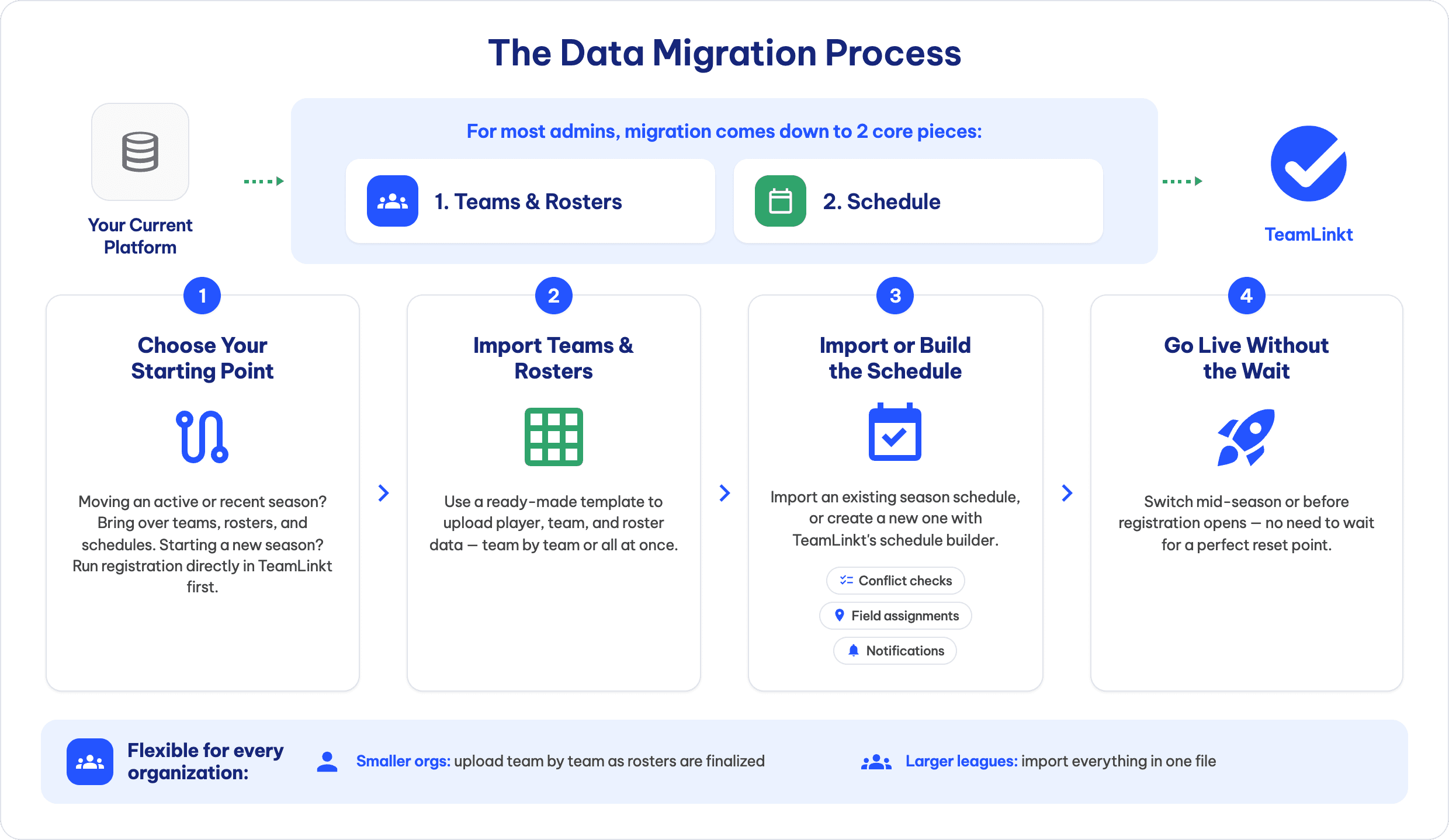
Teams and rosters. Start on the SportsEngine side by pulling an export of your teams, players, and contacts, most admins do this from their account settings or reporting tools before touching TeamLinkt at all. From there, drop that data into TeamLinkt's import template and upload it. Larger leagues typically move everything in a single file, while smaller organizations tend to bring teams over one at a time as each roster gets finalized, whichever fits how your season is actually organized.
Your schedule. An existing SportsEngine schedule imports directly rather than needing to be manually rebuilt game by game. If you don't have one locked in yet, or you're making the switch before a new season starts, TeamLinkt's schedule builder builds it from scratch, handling field conflicts and notifications as you go rather than requiring you to import something that doesn't exist yet.
One planning note: if you're switching ahead of a new registration cycle rather than mid-season, you'll skip the import step for rosters entirely and just run registration directly on TeamLinkt, the same process you'd use every season after.
Roster and schedule imports are the fast part of this whole process. The slower pieces, your website, historical records, and everything involved in actually settling in, are what stretch the timeline to the two-to-four-week window covered next.
What Happens When You're Switching from SportsEngine: The Data Migration Process
Two things make the actual move to TeamLinkt: your roster data and your schedule. Everything else in this guide builds off getting those two pieces over correctly.
Teams and rosters. Start on the SportsEngine side by pulling an export of your teams, players, and contacts, most admins do this from their account settings or reporting tools before touching TeamLinkt at all. From there, drop that data into TeamLinkt's import template and upload it. Larger leagues typically move everything in a single file, while smaller organizations tend to bring teams over one at a time as each roster gets finalized, whichever fits how your season is actually organized.
Your schedule. An existing SportsEngine schedule imports directly rather than needing to be manually rebuilt game by game. If you don't have one locked in yet, or you're making the switch before a new season starts, TeamLinkt's schedule builder builds it from scratch, handling field conflicts and notifications as you go rather than requiring you to import something that doesn't exist yet.
One planning note: if you're switching ahead of a new registration cycle rather than mid-season, you'll skip the import step for rosters entirely and just run registration directly on TeamLinkt, the same process you'd use every season after.
Roster and schedule imports are the fast part of this whole process. The slower pieces, your website, historical records, and everything involved in actually settling in, are what stretch the timeline to the two-to-four-week window covered next.
Can I still Import My Players if I've Already Run Registration?
Short answer: yes, and you won't need to touch registration again for the season you already ran.
Here's the mechanism. When you're switching mid-year, TeamLinkt pulls in your existing rosters, players, teams, and division assignments, from the export you already have, rather than asking your families to fill anything out a second time. The players you already registered on SportsEngine show up in TeamLinkt through the import, not through a new sign-up.
That distinction matters more than it might seem on paper. Asking parents to re-register for a season that's already underway is one of the more reliable ways to generate a wave of confused emails and complaints, and it's often the exact thing that makes admins talk themselves out of switching altogether, even when they know their current platform isn't working for them. Since the import is built off your existing data rather than a fresh sign-up flow, when you happened to run registration on SportsEngine has no bearing on whether or when you can make the move.
TeamLinkt's registration tools come into the picture afterward, for your next season, late additions, or ongoing payment collection, not for the players you've already brought on board this year.
Can I still Import My Players if I've Already Run Registration?
Short answer: yes, and you won't need to touch registration again for the season you already ran.
Here's the mechanism. When you're switching mid-year, TeamLinkt pulls in your existing rosters, players, teams, and division assignments, from the export you already have, rather than asking your families to fill anything out a second time. The players you already registered on SportsEngine show up in TeamLinkt through the import, not through a new sign-up.
That distinction matters more than it might seem on paper. Asking parents to re-register for a season that's already underway is one of the more reliable ways to generate a wave of confused emails and complaints, and it's often the exact thing that makes admins talk themselves out of switching altogether, even when they know their current platform isn't working for them. Since the import is built off your existing data rather than a fresh sign-up flow, when you happened to run registration on SportsEngine has no bearing on whether or when you can make the move.
TeamLinkt's registration tools come into the picture afterward, for your next season, late additions, or ongoing payment collection, not for the players you've already brought on board this year.
What Happens to Your League Website?
Website migration is usually where admins expect the most pain, and it's typically the part that surprises them by being simple. TeamLinkt has a dedicated SportsEngine website importer built specifically for this: point it at your current site, and it pulls your content, branding, and color scheme into a TeamLinkt website builder template automatically.
The process itself is a few clicks: from your TeamLinkt organization, navigate to Website, drop in your existing site's URL, and hit Import. What comes out the other end isn't a blank template you're filling in from scratch, it's a working starting point built from what you already had, ready for you to adjust rather than rebuild. Worth flagging up front: this importer is meant for the initial migration itself, not something available to run again down the line once your organization is already set up on TeamLinkt.
If setting up the site yourself isn't something you have time for, that's a separate, equally valid path. TeamLinkt's Launch package hands the entire build off to the team, they construct and launch your website for you. Admins juggling a mid-season switch on top of everything else often find this the more realistic option.
Whichever route you take, you land in the same place: a branded, functioning league website on TeamLinkt, without starting your online presence over from zero.
What Happens to Your League Website?
Website migration is usually where admins expect the most pain, and it's typically the part that surprises them by being simple. TeamLinkt has a dedicated SportsEngine website importer built specifically for this: point it at your current site, and it pulls your content, branding, and color scheme into a TeamLinkt website builder template automatically.
The process itself is a few clicks: from your TeamLinkt organization, navigate to Website, drop in your existing site's URL, and hit Import. What comes out the other end isn't a blank template you're filling in from scratch, it's a working starting point built from what you already had, ready for you to adjust rather than rebuild. Worth flagging up front: this importer is meant for the initial migration itself, not something available to run again down the line once your organization is already set up on TeamLinkt.
If setting up the site yourself isn't something you have time for, that's a separate, equally valid path. TeamLinkt's Launch package hands the entire build off to the team, they construct and launch your website for you. Admins juggling a mid-season switch on top of everything else often find this the more realistic option.
Whichever route you take, you land in the same place: a branded, functioning league website on TeamLinkt, without starting your online presence over from zero.
How Long Does Switching from SportsEngine Actually Take?

Timeline questions usually break down into what's automated versus what takes actual planning, and those two categories move at very different speeds.
Rosters and schedule. Typically land in TeamLinkt within a day of uploading your export, assuming you've got that export ready to go. Bigger leagues with more divisions and teams might stretch that slightly, simply because there's more volume to move through, but it's still measured in hours, not weeks.
Your website. The importer itself takes minutes to run, and even a fully custom build through the Launch package is a matter of days once it's scheduled.
Planning and family communication. This is what actually fills out a realistic timeline: deciding when to make the move, pulling and saving any historical data you want to keep, and giving your families enough notice, ideally three to four weeks, before anything changes for them. Skip that groundwork and the technical migration can still be fast; skip it and rush the communication piece, and you'll spend more time fielding parent questions after the fact than you would have spent planning ahead of it.
Add it up and most leagues should budget two to four weeks for the full switch, the same window the SportsEngine alternatives guide recommends, with the actual data and website work wrapping in a fraction of that time. Between seasons remains the cleanest window if your calendar allows it, but it's far from the only one that works.
How Long Does Switching from SportsEngine Actually Take?
Timeline questions usually break down into what's automated versus what takes actual planning, and those two categories move at very different speeds.
Rosters and schedule. Typically land in TeamLinkt within a day of uploading your export, assuming you've got that export ready to go. Bigger leagues with more divisions and teams might stretch that slightly, simply because there's more volume to move through, but it's still measured in hours, not weeks.
Your website. The importer itself takes minutes to run, and even a fully custom build through the Launch package is a matter of days once it's scheduled.
Planning and family communication. This is what actually fills out a realistic timeline: deciding when to make the move, pulling and saving any historical data you want to keep, and giving your families enough notice, ideally three to four weeks, before anything changes for them. Skip that groundwork and the technical migration can still be fast; skip it and rush the communication piece, and you'll spend more time fielding parent questions after the fact than you would have spent planning ahead of it.
Add it up and most leagues should budget two to four weeks for the full switch, the same window the SportsEngine alternatives guide recommends, with the actual data and website work wrapping in a fraction of that time. Between seasons remains the cleanest window if your calendar allows it, but it's far from the only one that works.
Stay Connected
Leave your information below for monthly tips to grow and streamline your sports organization.
Stay Connected
Leave your information below for monthly tips to grow and streamline your sports organization.
What to Do Before the Switch
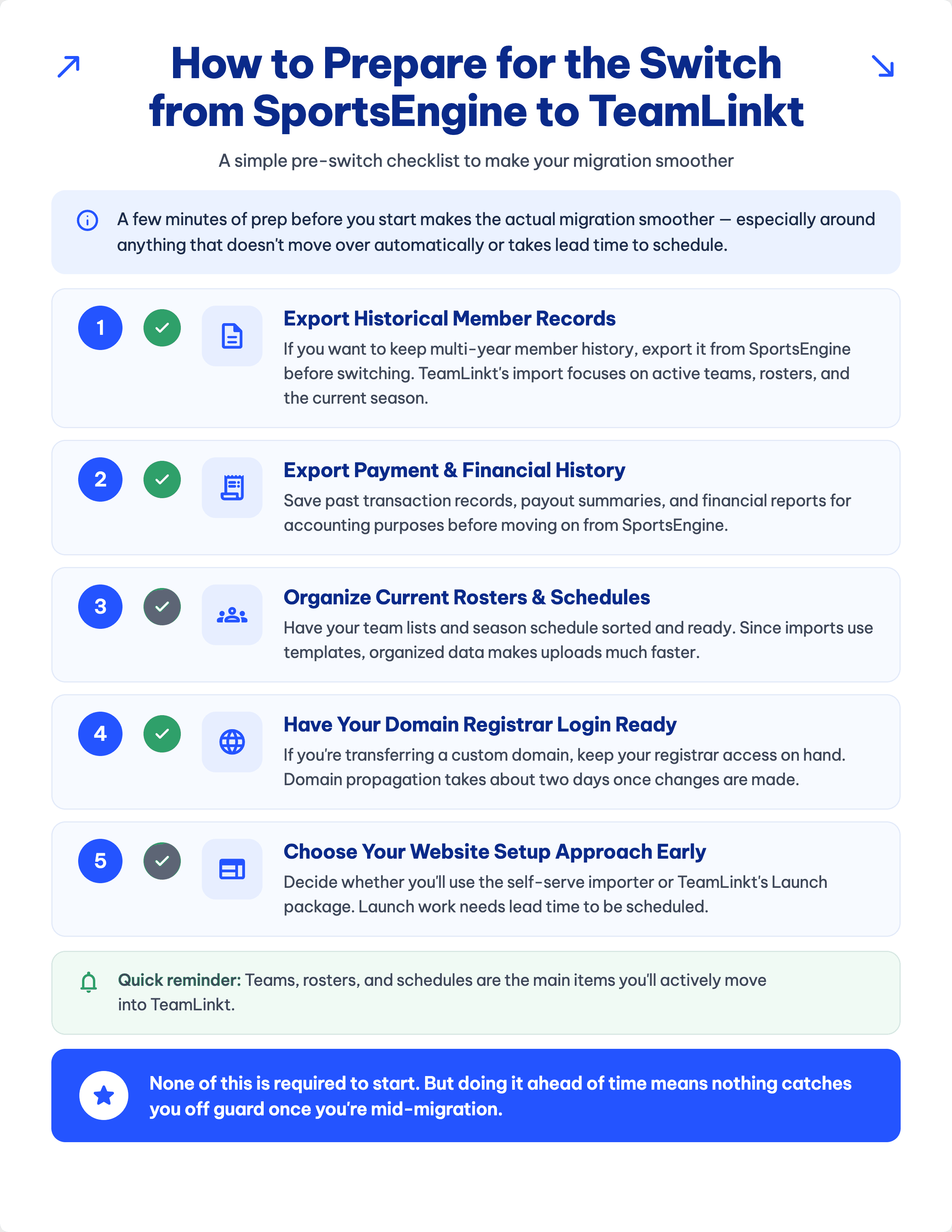
A little prep work up front shortens the whole process, mostly around the pieces that don't move automatically or need lead time booked in advance.
Pull your historical member records first, if you want them. TeamLinkt's import is built around your active teams, rosters, and current season, not a full multi-year archive. Anything older that matters to your organization should come out of SportsEngine into a spreadsheet before you move on.
Do the same with payment and financial history. Past transactions and accounting reports won't carry over as part of the standard import, so save what you need on your end ahead of time.
Get your rosters and schedule spreadsheet-ready. The import runs off templates, so the more organized your team lists and season schedule already are, the faster the actual upload goes once you start.
Pick your website path before you need to. Self-serve importer or the Launch package, deciding early matters because Launch requires scheduling lead time. Waiting until launch week to decide is what turns your website into the slowest part of an otherwise quick switch.
Loop your families in early. A short heads-up three to four weeks out, covering what's changing and what they'll need to do, heads off a lot of support questions before they ever land in your inbox.
None of this is required to get started. But knocking it out ahead of time is what keeps the middle of your migration from throwing surprises at you.
Download a Pre-Switch Checklist here
What to Do Before the Switch
A little prep work up front shortens the whole process, mostly around the pieces that don't move automatically or need lead time booked in advance.
Pull your historical member records first, if you want them. TeamLinkt's import is built around your active teams, rosters, and current season, not a full multi-year archive. Anything older that matters to your organization should come out of SportsEngine into a spreadsheet before you move on.
Do the same with payment and financial history. Past transactions and accounting reports won't carry over as part of the standard import, so save what you need on your end ahead of time.
Get your rosters and schedule spreadsheet-ready. The import runs off templates, so the more organized your team lists and season schedule already are, the faster the actual upload goes once you start.
Pick your website path before you need to. Self-serve importer or the Launch package, deciding early matters because Launch requires scheduling lead time. Waiting until launch week to decide is what turns your website into the slowest part of an otherwise quick switch.
Loop your families in early. A short heads-up three to four weeks out, covering what's changing and what they'll need to do, heads off a lot of support questions before they ever land in your inbox.
None of this is required to get started. But knocking it out ahead of time is what keeps the middle of your migration from throwing surprises at you.
Download a Pre-Switch Checklist here
What Doesn't Transfer and What to Do About It
Two questions come up more than any others when admins ask what the import misses: what happens to years of member history, and what happens to stats logged mid-season.
Your full historical member database. TeamLinkt's import is scoped to active teams, rosters, and the current season, not a running archive going back years. That sounds like more of a loss than it actually is: since you'll have already exported anything worth keeping in the prep step above, that history doesn't disappear, it just lives on your end instead of inside TeamLinkt automatically.
Mid-season stats, standings, and scores. Live numbers don't move over cleanly if you're switching partway through a season, there's no automated way to carry those over. Realistically, that means either manually entering what's already logged so your new platform reflects where things stand, or drawing a line at the switch date and tracking everything fresh from there instead of backfilling the season so far.
Neither of these should stop a league from making the move. They're simply the two spots that need a bit of manual attention rather than the one-click handling the roster and schedule imports get.
What Doesn't Transfer and What to Do About It
Two questions come up more than any others when admins ask what the import misses: what happens to years of member history, and what happens to stats logged mid-season.
Your full historical member database. TeamLinkt's import is scoped to active teams, rosters, and the current season, not a running archive going back years. That sounds like more of a loss than it actually is: since you'll have already exported anything worth keeping in the prep step above, that history doesn't disappear, it just lives on your end instead of inside TeamLinkt automatically.
Mid-season stats, standings, and scores. Live numbers don't move over cleanly if you're switching partway through a season, there's no automated way to carry those over. Realistically, that means either manually entering what's already logged so your new platform reflects where things stand, or drawing a line at the switch date and tracking everything fresh from there instead of backfilling the season so far.
Neither of these should stop a league from making the move. They're simply the two spots that need a bit of manual attention rather than the one-click handling the roster and schedule imports get.
What Kind of Support Do You Get During the Switch?
The real worry underneath any platform switch isn't the mechanics, it's what happens if something breaks halfway through, or six months after you've settled in and everyone assumes you're on your own.
Organizations switching from SportsEngine are assigned a dedicated rep for the process itself, someone who's there from the first import through whatever comes up in your early weeks live. That's a different setup than getting routed into a general queue each time you have a question, it's one person who already knows your migration, not a new conversation every time.
That support doesn't taper off once you're live, either. TeamLinkt runs support through live chat rather than ticket queues, seven days a week, and stays engaged well beyond onboarding as your program grows. A lot of platforms treat the switch itself as the finish line, get you set up, collect the setup fee, and move on. TeamLinkt's approach assumes the relationship continues for as long as you're actually running your league on it.
Individually, none of the migration steps, imports, website, timing, are especially hard. What actually reduces the risk of switching is knowing someone's still reachable in month six, not just during week one.
What Kind of Support Do You Get During the Switch?
The real worry underneath any platform switch isn't the mechanics, it's what happens if something breaks halfway through, or six months after you've settled in and everyone assumes you're on your own.
Organizations switching from SportsEngine are assigned a dedicated rep for the process itself, someone who's there from the first import through whatever comes up in your early weeks live. That's a different setup than getting routed into a general queue each time you have a question, it's one person who already knows your migration, not a new conversation every time.
That support doesn't taper off once you're live, either. TeamLinkt runs support through live chat rather than ticket queues, seven days a week, and stays engaged well beyond onboarding as your program grows. A lot of platforms treat the switch itself as the finish line, get you set up, collect the setup fee, and move on. TeamLinkt's approach assumes the relationship continues for as long as you're actually running your league on it.
Individually, none of the migration steps, imports, website, timing, are especially hard. What actually reduces the risk of switching is knowing someone's still reachable in month six, not just during week one.
Ready to Switch from SportsEngine to TeamLinkt?
Switching from SportsEngine to TeamLinkt isn't the disruptive, multi-week project it can feel like from the outside. Your teams, rosters, and schedule can be live within a day. Your website can follow within hours, or you can hand it off entirely through the Launch package. The only pieces that take real, hands-on work, historical records and mid-season stats, are known upfront, not discovered halfway through.
You're not figuring this out alone either. TeamLinkt works with more than 3,500 organizations, many of whom made this same switch, most with a dedicated rep guiding the process from the first import onward.
If you're still weighing your options, 8 SportsEngine Alternatives to Consider in 2026 is a good next read. And if you're ready to see what your season would actually look like on TeamLinkt, book a demo and we'll walk through the switch with you, roster by roster, season by season.
Ready to Switch from SportsEngine to TeamLinkt?
Switching from SportsEngine to TeamLinkt isn't the disruptive, multi-week project it can feel like from the outside. Your teams, rosters, and schedule can be live within a day. Your website can follow within hours, or you can hand it off entirely through the Launch package. The only pieces that take real, hands-on work, historical records and mid-season stats, are known upfront, not discovered halfway through.
You're not figuring this out alone either. TeamLinkt works with more than 3,500 organizations, many of whom made this same switch, most with a dedicated rep guiding the process from the first import onward.
If you're still weighing your options, 8 SportsEngine Alternatives to Consider in 2026 is a good next read. And if you're ready to see what your season would actually look like on TeamLinkt, book a demo and we'll walk through the switch with you, roster by roster, season by season.

Vince Ocampo
Marketing Specialist | TeamLinkt
Vince is a Marketing Specialist at TeamLinkt focused on content strategy, SEO, and AI-driven search in the youth sports space.
Vince Ocampo
Marketing Specialist | TeamLinkt
Vince is a Marketing Specialist at TeamLinkt focused on content strategy, SEO, and AI-driven search in the youth sports space.

Limited-Time Offer: Save $3,000
Move off SportsEngine with a free, no-downtime migration, before your next season starts.
Your Next Season Starts Here
Join thousands of sports organizations that manage registration, scheduling, and communication in one place.
Your Next Season Starts Here
Join thousands of sports organizations that manage registration, scheduling, and communication in one place.
Sports
sports_basketball
sports_football
sports_baseball
sports_soccer
ice_skating
sports_baseball
sports_volleyball
sports_baseball
sports_rugby
sports_hockey
sports_cricket
pool
sports_gymnastics
star_shine
sports_esports
sports_gymnastics
sports_martial_arts
sports
artist
Programs
Product
Enroll & Register
Plan & Schedule